Neatly sort your salary
in a few taps
Neatly sort your salary
in a few taps
Split any incoming money across Spaces, Under 16s and other Starling accounts in one go.
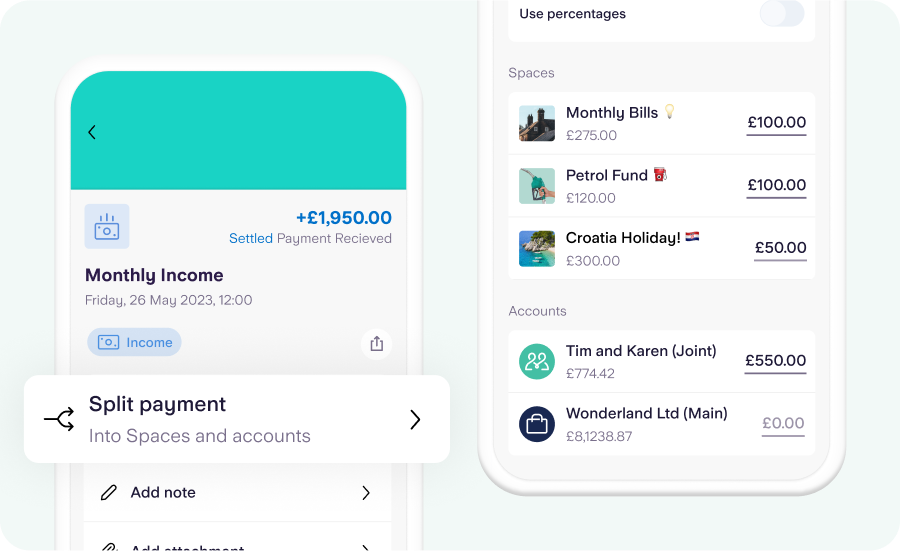
What is Split Payment?
Split Payment allows you to spread incoming money across your different Spaces and Starling accounts – such as your joint account, business account or kid’s Under 16s Space – in one go.
You can split as much or as little of the payment as you want, and you can choose to share a certain percentage, or a specific amount. Once you’ve split a payment, you won’t be able to split it again (as the money will already have been moved around).
In the app, head to your feed and tap on any inbound transaction to split a payment.
Benefits of Split Payment
Location, location, location. Splitting your income across different Spaces and accounts used to take a little while. Now you can share it across as many locations as you want, all from one screen, and all in rapid time.
Build good money habits. It couldn’t be easier to set aside some money as soon as you receive it. You could start small by setting aside 5% or less, and build up from there – if you can.
Many happy VAT returns. You can split a payment by percentages – if you have a business account, you can quickly set 20% of it aside in a VAT Space.
How to split a payment
Step 1
From your transaction feed, tap on any payment you have received.
Step 2
Select Split payment from the list of options.
Step 3
Choose how to divide the payment. You can split by percentage, or enter a figure.
Step 4
Confirm your choices by tapping Review and then Split payment again.